Book Appointment Now

How Long Can a Resume Be? 4 Proven Rules by Experience
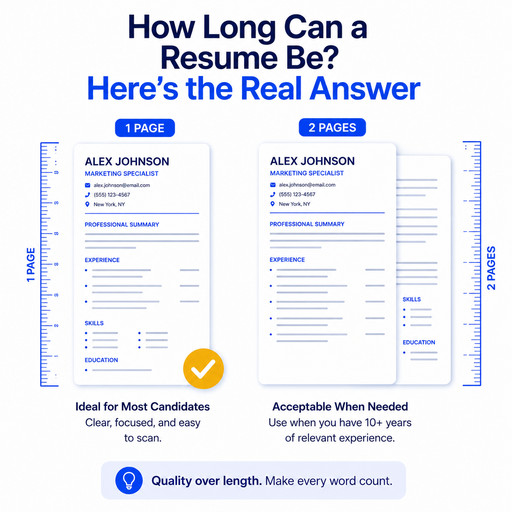
How long can a resume be? Still trying to squeeze yours onto one page? You might not need to. The real answer depends on how much experience you have, not one fixed rule for everyone. If someone told you your resume must fit on one page, no matter what, that advice is outdated for most job seekers today.
Let’s break down the right length for you, and why it works that way.
Table of Contents
How Long Can a Resume Be? The Quick Answer
Here’s the breakdown, based on where you are in your career.
Entry-level (0–5 years): One page. Stick to internships, school projects, and your first jobs. You likely don’t have enough relevant experience yet to fill more space.
Mid-career (5–15 years): One to two pages. Only use the second page if you have real, relevant achievements to fill it, not just to look busier.
Senior-level (15+ years): Two pages. At this stage, your leadership and career growth matter more than your early job history.
Executive, academic, or specialized roles: Three pages can work in fields like academia, medicine, or government, where a longer career history is expected. Outside those fields, three pages is rarely the right call.
Why This Rule Actually Exists
Most resume advice gives you a number without explaining where it comes from. So how long can a resume be, really? Here’s the actual reason behind the rule.
Recruiters glance at a resume for a few seconds, not minutes. That’s why short, relevant content matters more than sheer length. If your resume takes too long to make its point, you risk losing that attention before you even get your chance.
There’s a second piece, too, one most advice skips: Applicant Tracking Systems, or ATS. Most companies use ATS software to screen resumes before a person ever sees them. If your resume only has one page of content, you have fewer chances to include the exact keywords these systems scan for. A resume with a little more room, used well, can actually do better in that first digital screening.
So the real rule isn’t “shorter is always better.” It’s “every line should earn its place, no matter how long your resume ends up being.”
Is a One-Page Resume Always Better?
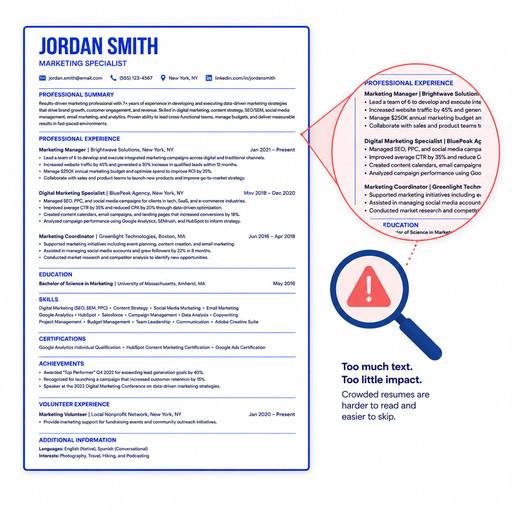
No. For experienced professionals, it can actually hurt you. How long can a resume be before it starts working against you? Usually, once you’ve got 10, 15, or 20 years of experience and it’s still squeezed onto one page. It can look like you’re leaving out real accomplishments, or cramming your experience so tight that the important parts get lost.
A one-page resume makes sense when you’re just starting out. Once you have more experience, using it well often means using more than one page.
What to Cut First If Your Resume Runs Long
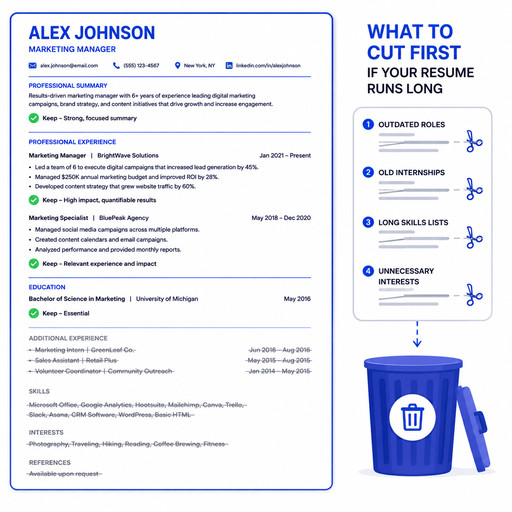
If your resume runs past the right length for your experience, here’s what to cut first.
Old or Irrelevant Job History
As a general rule, only go back about 15 years. Older roles rarely add value unless they’re directly relevant to the job you want now. Keeping them can bury the more recent, more important parts of your resume.
Repeated Skills Across Multiple Roles
Did you list the same skill under three different jobs? You only need it once. Repeating it doesn’t make your case stronger. It just takes up space you could use for something new.
Generic Duties Instead of Achievements
“Managed a team” tells a recruiter almost nothing. Cut general lines like this first. Keep the specific, measurable wins instead: “Managed a team of 8, cutting project turnaround time by 30%.” If a line could describe almost anyone in that role, it’s a strong candidate to cut.
How Far Back Should Your Work History Go?
As we said above, 15 years is the general rule. Past that point, older roles are less likely to reflect your current skills. Including them can make your resume feel dated instead of experienced.
The one exception: if an older role is unusually relevant to the job you want now, a brief, one-line mention is often enough. It doesn’t need the same detail as your recent roles.
The Real Fix Isn’t Length, It’s Tailoring
Here’s what most resume advice misses completely: length isn’t really the problem. Relevance is.
A resume built specifically for one job naturally lands at the right length, because everything that doesn’t support that application gets cut. A resume that runs too long usually isn’t long because the person has “too much experience.” It’s long because it’s trying to fit every job at once, instead of the one job in front of you.
This is exactly what Lightforth’s Resume Builder is built to fix. Instead of you deciding what to trim for every application, it matches your resume’s content and keywords straight to each job posting, keeping what’s relevant and cutting what isn’t. The result usually lands at the right length on its own, because it’s built around one specific job, not a generic version of your whole career.
But a well-tailored, right-length resume only solves the first step. You still need to get it in front of enough employers. Then you need to perform once you land the interview.
Applying to enough jobs takes time most people don’t have. Tailoring one resume is manageable. Tailoring twenty a week, on top of your current job, isn’t. Lightforth’s Auto-Apply feature handles this part for you. It searches job boards like LinkedIn, Indeed, and Glassdoor for roles that match what you’re looking for, then applies on your behalf. That way, your tailored resume actually reaches enough employers to make a difference.
A great resume still needs a strong interview to close the deal. Landing the interview doesn’t mean you’ll perform well once you’re in it. Even qualified people freeze up or ramble under pressure. Lightforth’s Interview Prep gives you voice-based mock interviews with real-time feedback, built around methods like STAR, so you’re practicing the actual skill of answering under pressure. During the real interview, Interview Copilot gives you live support right when your nerves usually hit hardest.
Put together, Resume Builder, Auto-Apply, Interview Prep, and Interview Copilot cover the whole path. From a resume that’s the right length and relevance, to a full inbox of applications, to an interview you’re actually ready for.
Start Building the Right Length Resume Today
You don’t need to guess how long can a resume be for you specifically, or worry that two pages will cost you an interview. The right length comes naturally once your resume is built around the job you actually want. And that’s just one part of a job search Lightforth is built to carry from start to finish.
Activate Pro for $10 and get full access to Resume Builder, Auto-Apply, Interview Prep, and Interview Copilot, before it renews at $49 a month. Not ready to commit yet? Start with your 5 free monthly credits, or upgrade to Pro whenever you’re ready to move faster.
Is a 2 page resume ok?
Yes, especially if you have 5 or more years of experience. A two-page resume is completely normal for mid-career and senior professionals, as long as every section stays relevant to the job you’re applying for. It only becomes a problem if the second page is filled with filler instead of real achievements.
Is a 3 page resume too long?
For most jobs, yes. Three pages only makes sense in specific fields like academia, medicine, or government, where a longer career history is expected and often required. Outside of those fields, three pages usually signals it’s time to cut older or less relevant experience, not add more.
How long should a 20 year resume be?
Two pages is the right target. At 20 years of experience, you’re well past entry-level, so a one-page resume risks cutting real accomplishments. Stick to your most recent 15 years of work in detail, and summarize anything older in just a line or two if it’s still relevant.
Is a resume A4 or A3?
A resume should be A4 (or US Letter size in the United States), never A3. A3 is roughly double the size of a standard page and isn’t used for resumes anywhere, it’s a size meant for posters or large documents, not a document meant to be quickly scanned by a recruiter or an ATS.
What font size should I use to fit my resume on the right number of pages?
Keep your font size between 10 and 12 points. Going smaller to force extra content onto fewer pages usually backfires, it makes your resume harder to read and can hurt you more than the extra page would have. If you’re struggling to fit everything at a readable size, that’s usually a sign to cut content, not shrink the font.